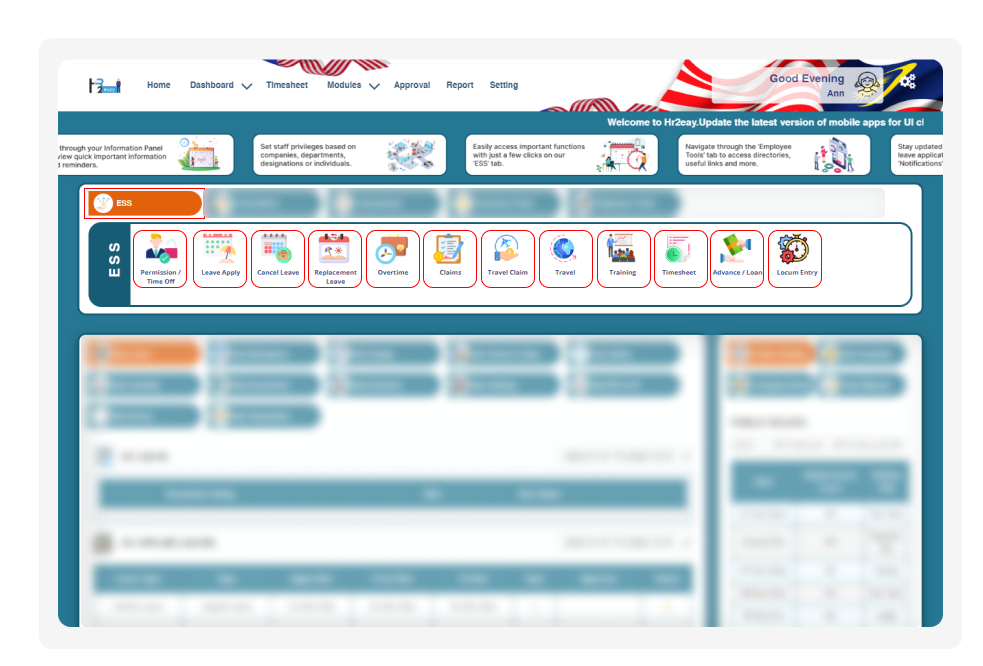
HR2eazy Employee Self Service (ESS) module

Employee Self Service

Everything Your Staff Needs in Just a Few Clicks

With HR2eazy's Employee Self Service Feature

Employees handle their own HR tasks from one place, on the web portal or the mobile app. Managers, HR and business owners get every request in front of them to approve or reject. Talk to us if you would like to manage your HR processes more efficiently.

Get Free Demo Get Started

What Is Employee Self Service (ESS) in HR2eazy?

Employee Self Service (ESS) in HR2eazy is a cloud-based HRMS module that lets employees update their details, apply for leave, overtime, claims, travel and petty cash, and view their payslips, attendance and work schedule without going through HR. Managers, HR and business owners receive each request, approve or reject it, and the employee is notified of the result. ESS works on both the web portal and the mobile app, and what each person sees depends on their role. It helps Malaysian businesses move everyday HR requests online.

ESS for Employees

Employees can check their own information and send requests at any time, on the web portal or the mobile app, without waiting for HR to reply. Every request goes to the right approver, and the employee is notified once it is approved or rejected.

Requests and personal details

  • Update personal information
  • Apply for leave and check leave balance
  • Apply for overtime
  • Apply for claims
  • Apply for petty cash
  • Apply for travel

Pay and records

  • View payslips, password protected
  • Download tax forms
  • View attendance records
  • View KPI records

Work and company

  • View work schedule
  • View company announcements
  • See public holidays, birthdays and work anniversaries

HR2eazy Employee Self Service for employees
HR2eazy Employee Self Service for managers, HR and business owners

ESS for Managers, HR & Business Owners

Managers, HR and business owners see every employee request in one place and decide on it online. What each person sees depends on their role, and approvals can run through more than one level.

Requests and approvals

  • Get notified when an employee applies for leave, overtime, claims, travel or petty cash
  • Approve or reject requests online, with multi-level approval
  • The employee is notified of the decision

Team and records

  • Manage work schedules and attendance
  • Manage transaction details
  • View payslips, password protected
  • Manage new joiner onboarding

Access

  • Role-based access, so each user only sees what their role allows

With HR2eazy ESS, there is less back-and-forth between employees and HR, and every request reaches the right person directly.

How a Request Moves Through ESS

From the employee's request to the final decision, every step happens in one place.

1
Employee applies

The employee sends the request on the web portal or the mobile app.

2
Approver is notified

The manager, HR or business owner is notified straight away.

3
Request is decided

The request is approved or rejected, through multiple levels where set up.

4
Employee is notified

The employee receives the outcome, with no need to chase HR.
HR2eazy employee monthly payslip for Malaysian SMEs

ESS for Malaysian SMEs

Small and medium businesses rarely have a large HR team. ESS lets employees handle routine requests themselves, so the people running HR can focus on approvals and the rest of the business.

  • Employees apply for leave, overtime and claims without paper forms or chat messages
  • Owners and managers approve requests online, on the web portal or the mobile app
  • Role-based access keeps each person to what their role allows
  • The same setup can keep working as the team grows

HR2eazy also has a solution built for Malaysian SMEs. See how it fits a smaller team.

How HR2eazy Eazydesk Helps

Employees send their requests through ESS, and managers, team leads and business owners can then use HR2eazy Eazydesk, a Windows app, to keep track of their team. You type a question, such as who was late today, what an employee's leave balance is, or where a claim approval is, and Eazydesk answers without you searching through screens or waiting for another team. It also covers overtime, allowance details, pending claim approvals and claim spend by department, and each person only sees what their access level and role allow.
HR2eazy Eazydesk attendance and extra time details for managers

How ESS Connects to Other Modules

Employees apply for leave and see their leave balance in ESS.

Employees view their attendance, and managers manage it.

Employees send overtime requests, and managers approve them.

Employees submit claims in ESS. Approved claims go to HR2eazy Payroll.

Employees apply for petty cash in ESS.

Employees apply for travel in ESS.

Employees view their payslips and download tax forms in ESS.

Employees view their KPI records in ESS.

Frequently Asked Questions (FAQ)

Employee self-service software lets employees handle their own HR tasks online instead of asking HR each time. In an HRMS, the employee self-service (ESS) portal is where employees update their details, apply for leave, submit claims and view payslips. Managers and HR use the same system to review and approve those requests.
An employee logs in on the web portal or the mobile app and submits a request, such as leave or overtime. The approver is notified, reviews the request, and approves or rejects it, with more than one approval level where the company sets it up. The employee is then notified of the outcome, so nobody has to chase by email or message.
Employees can update their personal information. They can also apply for leave and check their leave balance, and apply for overtime, claims, petty cash and travel. They can view their payslips (password protected), attendance, work schedule and KPI records, and download tax forms. They can also see company announcements, public holidays, birthdays and work anniversaries. Since they get notified when a request is approved or rejected, they rarely need to contact HR for routine matters.
Yes. HR2eazy ESS works on both the web portal and the mobile app. Employees can apply for leave or check their payslip from their phone, and managers see the same requests whichever one they use.
They are notified when an employee applies, and they approve or reject leave, overtime, claims, petty cash and travel requests online. They can also manage work schedules and attendance, view transaction details, view payslips and manage the onboarding of new joiners. What each person sees depends on their role.
Employees get direct access to their own information without waiting for HR. HR spends less time on routine questions and data entry, and requests are handled online instead of on paper or by message. Records stay in one system, and the same process works as the headcount grows.
Employees can find their leave balance, payslips and schedule themselves, so there are fewer queries to answer. Requests arrive in a standard form and go straight to the approver, which removes manual forms and follow-ups. HR can then spend its time on approvals, exceptions and bigger HR work.
Employees can check their information and submit requests at any time, from the web or their phone. They are told when a request is approved or rejected, so they are not left guessing. ESS also makes it easier for employees to be heard directly by the relevant person or department.
An HRMS is the whole system a company uses to manage HR work, such as payroll, leave, attendance and claims. ESS is the part of that system that employees and approvers use directly. An employee portal is a general term, and an ESS portal is the portal where employees do their own HR tasks and managers act on them.
In a manual process, employees fill in forms or send emails, HR re-enters the data, and approvals are chased by hand. With ESS, the employee submits online, the request goes to the approver automatically, and everyone is notified of the result. HR stops being the go-between for every routine request and focuses on exceptions and approvals.
HR2eazy is an HRMS for Malaysian businesses that includes an ESS portal. Employees can manage leave, overtime, claims, petty cash and travel requests, and managers approve them online. HR2eazy supports businesses across Malaysia on both the web portal and the mobile app.
Look for leave applications with leave balance, overtime and claims, and notifications for both the approver and the employee. Look for approval levels that match your company, password-protected payslips and role-based access. Mobile access, access to attendance and schedules, and a link to payroll also matter. HR2eazy ESS covers all of these.
Yes. Small HR teams often spend a large share of their time on routine requests, and ESS lets employees handle those themselves. The same setup works as the business grows, so SMEs do not need to change the process later.
Move leave, overtime, claims, petty cash and travel requests into one ESS portal so employees stop using forms and chat messages. Set who approves what, and let the system notify both sides. With HR2eazy, employees can also view their attendance and payslips in the same place.
Security depends on how access is set up. In HR2eazy ESS, access is role-based, so each user only sees what their role allows, and payslips are password protected. When you compare any ESS software, also ask the vendor how it protects employee data.
In HR2eazy, ESS is the employee-facing part of one HRMS and works alongside modules such as Leave, Attendance, Overtime, Claim, Petty Cash, Travel, Payroll and KPI. For example, approved claims go to HR2eazy Payroll and can be paid with the monthly salary or as a separate payment.
A cloud-based portal lets employees and managers reach the same information on the web portal and the mobile app wherever they have internet access. Updates are made in one place, so everyone sees the same current data. HR2eazy ESS is cloud-based.
Compare which requests employees can make, how approvals work, whether notifications go both ways, and whether it works on mobile. Check the role-based access, whether it links to payroll and attendance, and how easy it is for employees to use. Before requesting a demo, write down your own requests (leave, overtime, claims) and ask the vendor to walk you through one from the employee's side and the manager's side.
Decide who uses it, set the roles and approval levels, and make sure employee data is accurate. Tell employees what they can do in ESS and start with the most common requests, such as leave. Using ESS as the only channel for routine requests, and keeping useful things like payslips and announcements there, helps adoption.
HR2eazy gives employees one place for their HR requests and managers one place to approve them. It works on the web portal and the mobile app, with role-based access, multi-level approvals and notifications on both sides. It also connects to modules like Leave, Claim and Payroll. You can request a demo to see how ESS would work for your company.

Employee Self Service Software for Malaysian Businesses

Give your employees one place for their HR requests, and your managers one place to approve them.

Get Free Demo Get Started